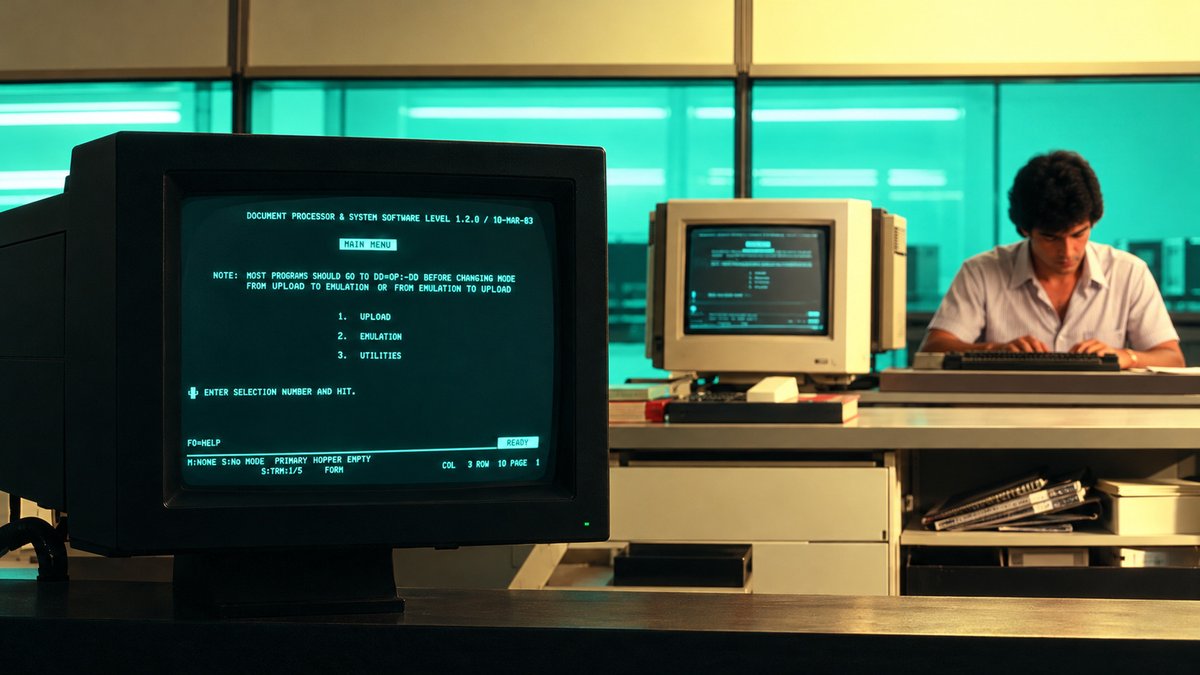
If you imagine a computer from the 1970s or 1980s, you might picture a black screen with bright green letters glowing on it. This style of screen was common in offices, schools, laboratories, and many other workplaces. It has also become famous through movies such as Alien and The Matrix, where green text often represents computers and secret digital systems. But why did old computers use green text instead of white, amber, or other colors? Was green simply fashionable, or was there a real reason for choosing it?
The answer is that green worked well with the screen technology available at the time. It could produce bright, easy-to-read text, and certain green screen materials worked well for long periods of use. Green monitors were also practical for computers that mainly displayed words and numbers instead of colorful pictures. However, not every old computer had a green screen. Some used amber or white text, and color computers were also available during this period. Green became especially popular because it offered a useful combination of clear text, reliable performance, and reasonable cost.
When Did Green Computer Screens Become Popular?
Green computer screens became widely associated with computer terminals during the 1960s, 1970s, and 1980s. They were especially common during the early years of personal computers, when many machines were designed to display text rather than detailed pictures. Before personal computers became common in homes, businesses and large organizations used computer terminals to communicate with larger computer systems. These terminals often had a keyboard and a screen.
People could type commands, read information, and enter data. Many terminals used a type of screen called a cathode-ray tube, or CRT. Some CRT monitors used green light to display characters against a dark background. During the 1970s, these screens became familiar in business offices, research centers, universities, and industrial workplaces. By the 1980s, green monochrome monitors were a common sight in the growing personal computer market.
A major example was the IBM Personal Computer, introduced on August 12, 1981. IBM offered a monochrome display option that showed text using green phosphor. This type of display was particularly useful for business tasks such as writing, calculations, and managing records. Green screens were not invented in 1981, and IBM was not the first company to use them. However, the popularity of early computer terminals and personal computers helped make the green-screen look familiar to millions of people.
How Did Old Computer Screens Produce Green Text?
Most old computer monitors used a technology called a cathode-ray tube (CRT). These monitors had large glass screens and were much heavier than modern flat-screen displays. Inside a CRT monitor, a part called an electron gun sent a beam of tiny particles called electrons toward the inside of the glass screen. The inside surface had a thin coating of a material that could produce light when the electrons hit it. This material was called phosphor.
When the electrons hit the phosphor, they transferred energy to it. The phosphor then released some of that energy as visible light. The glowing areas formed the letters, numbers, and symbols that appeared on the screen. The color depended on the type of phosphor used. Green phosphor produced green light, amber phosphor produced yellow-orange light, and white phosphor produced white light.
The electron beam moved across the screen very quickly, creating the characters and refreshing the image many times each second. This allowed the monitor to display text that people could read. The process was different from the way modern LCD screens work. An LCD uses a backlight and layers that control the light passing through the screen. A CRT, by contrast, created light when electrons struck the phosphor coating.
Also Read: Sega Genesis vs. Super Nintendo: Which Was Better?
What Was Green Phosphor?
Phosphor is the name given to a group of materials that produce light when they receive energy. In old CRT monitors, the energy came from the electron beam. One well-known green phosphor used in computer displays was called P31. It was made mainly from zinc sulfide with a small amount of copper added to help it produce light. When electrons struck P31, it produced a yellowish-green glow. This color was useful for computer displays because it appeared bright and made text easy to see.
P31 was known for several useful qualities. It could produce a strong glow, show small and clear dots, and resist screen damage caused by displaying the same image for long periods. An article about CRT screen design published through the Computer History Museum's archive describes P31 as a bright green phosphor with good focus and strong resistance to screen burn.
It also notes that P31 had a higher cost than some other phosphors, showing that green was not automatically the cheapest option in every situation. Not every green monitor used P31. Some IBM monochrome displays used another green phosphor called P39, which stayed glowing for longer after the electron beam moved away. The choice of material depended on the monitor's design and purpose.
Why Did Green Look So Bright?
One of the main reasons green was popular was the way the human eye responds to light. Our eyes do not see all colors with the same level of sensitivity. In normal daylight conditions, our eyes are most sensitive to light at around 555 nanometers, which is in the yellow-green part of the visible spectrum.
A nanometer is a very small unit used to measure length and the wavelength of light. Because our eyes are particularly sensitive to yellow-green light, a green screen could look bright without needing to produce as much light as some other colors might require. This helped make green text stand out against a dark background.
However, the brightness of a screen depended on more than its color. The type of phosphor, the strength of the electron beam, the screen settings, and the monitor's design all affected how bright the text appeared. Green was therefore a useful choice, but it was not the only color capable of producing a bright and readable display.
Why Was Clear Text So Important?
In the 1970s and 1980s, many computers were mainly used to display text and numbers. People used them to write documents, enter information, calculate figures, and manage business records. They did not always need colorful pictures, animations, or detailed graphics. A typical computer screen might show a list of names, a table of numbers, a command prompt, or a blinking cursor waiting for the user to type something.
In these situations, clear text was more important than having many colors. CRT monitors formed characters from small glowing dots. The dots had to be sharp enough for the letters to be easy to recognize. Some green phosphors, especially P31, were well suited to producing small, clearly defined dots. This helped monitors display readable text.
The focus of the electron beam also mattered. A well-focused beam created clearer characters, while a poorly focused beam could make the letters look blurry. The monitor's design, the quality of its parts, and the type of phosphor all worked together to affect the final image. Green was popular because it provided a practical way to display information clearly with the technology available at the time.
Why Did Computer Makers Use One Color Instead of Many?
The main reason was cost and simplicity. A monochrome monitor displays text and images using one main color, although the brightness of that color can vary. A green monochrome monitor, for example, can show bright green letters, darker green areas, and a black background. A color CRT monitor works differently. It usually uses three electron beams and groups of red, green, and blue phosphors.
By controlling the three colors, the monitor can produce many different colors. This system requires extra parts and a more complex design. The computer also needs suitable hardware to control the colors displayed on the screen. As a result, color systems were often more expensive than simple monochrome systems. For many early computer users, paying extra for color did not offer enough benefit.
If the computer was mainly used for typing, calculations, and keeping records, a green screen could do the job. Monochrome monitors were also useful for systems that needed to show the same type of information throughout the day. Their simple displays were well suited to these tasks. However, monochrome did not always mean green. Some monitors displayed amber or white text instead.
The IBM PC and the Cost of Early Computers
The history of the IBM Personal Computer provides a useful example of how computer displays changed during the early 1980s. On August 12, 1981, IBM introduced the IBM 5150 Personal Computer. It helped make personal computers more common in businesses and homes. The original IBM PC could be bought with different display options. One popular choice was the IBM Monochrome Display and Printer Adapter, commonly known as MDA, which worked with a green monochrome monitor.
The original IBM PC itself started at $1,565 with 16 KB of memory and no disk drive. Adding a display, two diskette drives, and a printer could bring the total to nearly $3,000 more. The exact price depended on the equipment selected. This example shows that computer systems were expensive at the time. Buyers had to decide which features they actually needed.
For people who mainly worked with text and numbers, a monochrome monitor was often a sensible choice. IBM's PC XT, introduced in March 1983, was also shown with a color monitor, reflecting how color displays were becoming part of the personal computer market. Color displays were available before this period, so 1983 was not the year color monitors were first invented. Rather, it was part of a period when color options were becoming more common in personal computing.
Why Did Some Monitors Use Amber or White Text?
Green was popular, but it was not the only color used in old computer monitors. Amber and white displays were also available. Each type used a different phosphor material, which gave the screen its own color and behavior.
Green Monitors
Green monitors were well suited to displaying text. Certain green phosphors provided strong brightness, clear dots, and good resistance to screen burn. They became closely associated with office computers and text-based terminals.
Amber Monitors
Amber monitors displayed letters in a warm yellow-orange color. Some users preferred amber because they found it comfortable to look at during long working sessions. Manufacturers sometimes advertised amber monitors as being easier on the eyes. However, there is no single color that is best for everyone's eyes. Comfort depends on screen brightness, contrast, room lighting, flicker, and personal preference. Amber monitors could also cost more than green monitors in some product ranges.
White Monitors
White monochrome monitors showed white or gray characters against a dark background. These screens offered a more neutral appearance and were useful for displaying text and other information. The choice between green, amber, and white depended on the phosphor material, the monitor's design, its price, and what the user wanted from the display.
What Was Screen Burn, and Why Was It a Problem?
Another important issue with old CRT monitors was screen burn, also known as burn-in. Screen burn could happen when the same image appeared on the screen for a very long time. The parts of the phosphor coating that were used most often could wear out differently from the rest. For example, an office computer might display the same menu, table, or rows of numbers for several hours every day.
After a long period of use, the outlines of those characters could remain faintly visible even when the screen showed something else. This was a problem for businesses because their computers often displayed the same information throughout the working day. Monitor makers therefore looked for phosphors that could produce clear images and resist this kind of damage. P31 green phosphor was known for its strong resistance to screen burn. This made it a useful option for monitors that displayed fixed text for long periods.
However, no CRT phosphor was completely safe from burn-in. The risk depended on how long an image stayed on the screen, how bright the display was, and the type of phosphor used. Modern OLED displays can also develop permanent changes in brightness when certain areas are used much more than others. The technology is different, but the general problem of uneven wear is similar.
Also Read: Why Do We Call Unwanted Email “Spam”?
What Was Phosphor Persistence?
Phosphor persistence describes how long a phosphor continues to glow after the electron beam moves away. This was important because a CRT monitor refreshed its image repeatedly. The phosphor needed to stay bright long enough for the image to appear steady to the viewer. If the glow faded too quickly, the screen could appear to flicker, especially when the refresh rate was low.
If the glow lasted too long, moving text or a moving cursor could leave a trail behind it. For example, imagine moving a cursor across a dark screen. If the phosphor continued glowing for too long, you might briefly see the cursor's previous positions as faint marks. Monitor makers had to balance brightness, flicker, and the ability to show movement clearly.
Different phosphors had different levels of persistence. P31 had medium-short persistence, while P39 was designed to glow for longer. P39 could help reduce flicker in some display designs, but its longer glow could leave trails and it was more likely to suffer from burn-in in certain uses. This is why choosing a phosphor involved more than choosing a color. The material also had to behave properly when the screen refreshed.
Why Did Green Screens Work Well in Offices?
During the early days of computing, many computers were used for work that required reading and entering information. Businesses used computers for accounting, payroll, stock control, customer records, and report writing. Laboratories and factories also used computer terminals to monitor equipment and enter data. For these tasks, a clear display was more important than colorful graphics.
Users often worked with text-based interfaces. They typed commands on a keyboard and read the results on the screen. The display might show rows of numbers, a list of records, or a message asking the user to enter information. Green text on a dark background worked well for these tasks. The monitors were also practical for workplaces where computers had to remain in use for many hours.
A well-designed green CRT could provide readable text without needing the more complex parts of a color display. When a company needed many terminals, choosing a less expensive monochrome monitor could also help control costs. For these reasons, green monitors became familiar in offices, industrial settings, research centers, and other workplaces.
Why Did Green Computer Screens Become Less Common?
Green screens did not disappear suddenly. They became less common as computer technology improved and people began using computers for more kinds of work. During the 1980s, color graphics systems became more widely available. For example, IBM introduced its Color Graphics Adapter, or CGA, in 1981. It allowed compatible computers to display color graphics with the right hardware and monitor.
IBM later introduced its Enhanced Graphics Adapter, or EGA, in 1984, which offered more colors and improved graphics options. These developments helped make color more useful. Computers were no longer limited to showing text and numbers. They were increasingly used for games, drawings, charts, colorful documents, and programs with menus and pictures. Color also became useful for graphical user interfaces, which let people work with windows, icons, and buttons instead of typing every command.
As color monitors became more affordable, more people had reasons to choose them. Monochrome monitors continued to be used where color was not necessary. Some businesses kept them because they worked well for their needs, while specialized equipment continued to use simple displays. Over time, however, color screens became the normal choice for personal computers.
Why Do Movies Still Show Green Computer Text?
Today, most people use LCD or OLED screens rather than CRT monitors. Yet the image of green text glowing on a black background remains popular. This is partly because the style is strongly connected with the early history of computers. It reminds people of old terminals, command lines, and the first decades of personal computing.
Movie makers and game designers also use green text to make a computer look mysterious, powerful, or futuristic. In The Matrix, released in 1999, streams of green characters became one of the film's most recognizable visual features. The style helped represent the digital world behind the story. Other movies and games use similar effects to suggest that a character is working with a computer system or examining hidden information.
Modern screens can create the same look without using old CRT technology. A normal LCD or OLED display can show green letters on a black background simply by lighting the correct pixels. The appearance has survived because it is easy to recognize and has become a familiar part of science-fiction culture.