
In the past, it was difficult to remove explicit content from Google Search, the users had to navigate through complicated help centers and also, the user had to file individual reports for creating different links. The new update by Google, attempts to integrate these requests directly into the "Search" experience.
Changes Made To Enhance User’s Search Privacy
Image-Reporting: If you identify an inappropriate image of yours, you can immediately flag that image directly through the “search results page,” available on the “three dot menu.”
Bulk Reporting/Submission: After the launching of this new feature, you no longer have to report images separately. Google has made it easy for its users to select the images to be reported and then get it submitted together in a much simplified manner.
Protection From Deepfake: The introduction of the reporting tool now includes specific options for AI-generated explicit imagery, highlighting a direct response to the rise of harmful deepfakes.
Active Safeguards: Once a user's request for the removal of images is successfully approved, they can immediately opt-in to a feature that proactively filters out similar results for your name in any future searches.
Monitoring Sensitive Data: The “Results about you” hub now monitors for government ID numbers, including passports, driver licenses and social security numbers.
Process To Remove Explicit Images From Search
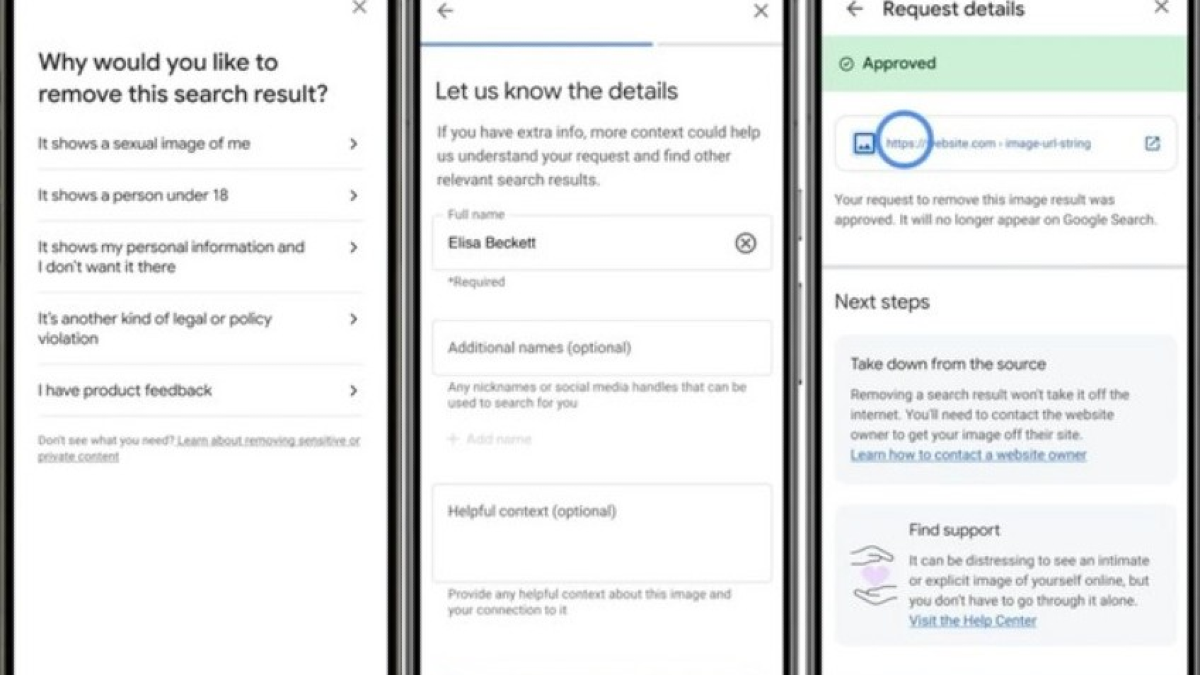
If you notice any inappropriate image of yours available online, you can follow these steps:
Locating The Image: Click on the three vertical dots in the top right corner of the image result.
Request For Removal: Once you identify that the image is inappropriate and should be removed immediately, you can select on the “remove result” option and then choose “It shows an explicit image of me.”
Specifying The Content Type: Make sure to specify whether the image is AI-generated or an original one.
Bulk Selection: If you can identify other inappropriate images, you can submit all the images together for approval.
Tracking Progress: To track the progress of your request, you can visit the “results about you” section from your Google app to monitor the status of your approval request. Google will also send timely updates to the user as the review progresses.
Insights From Google

In its official blog post, Google highlighted that the real motive behind the launching of this new tool was to reduce the emotional and technical burden borne by the victims of online harassment.
“Results about you” tool now helps you to find and request the removal of search results containing your government issued IDs, giving users even more peace of mind.” says, Phoebe Wong, the product manager of Google.